Meeting Studio Premium: 154 templates, a standup runner, and a waiting room that teaches while people join
Configure a title, countdown, and crew, then launch a full-screen meeting display. 154 art-directed templates, a live standup runner with an on-deck speaker queue, and a 40-design waiting-room info system that rotates real tips while everyone trickles in.
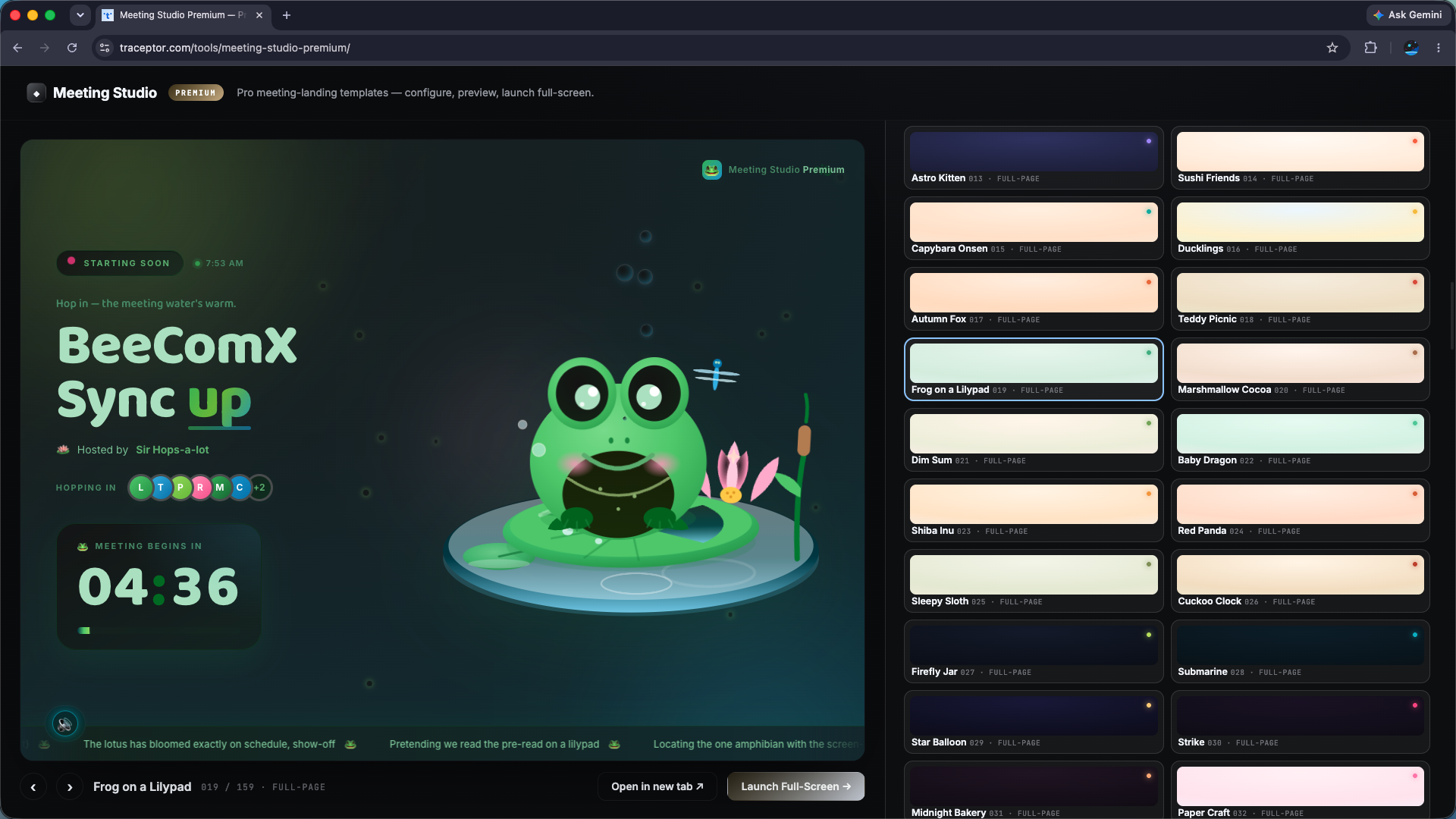
Every recurring meeting starts the same awkward way: a blank call window, three people already there, a Slack message asking if everyone’s joining. Meeting Studio Premium replaces that dead air with a full-screen countdown, an actual working standup runner, and something worth reading while the last few stragglers show up.
It lives at traceptor.com/tools/meeting-studio-premium — a browser tool, no install, no account. Configure it once, launch full-screen on the conference-room TV or share the link, and it remembers your setup for next time.

What it actually is
Meeting Studio Premium is a single configuration screen with a live preview on the left and every setting on the right — meeting title, optional subtitle, countdown length, your crew’s names and notes, background music, a meeting link for the “Join Meeting Now” button, and the template itself. The preview isn’t a screenshot; it mounts the real template engine in an iframe, so what you see is exactly what launches.
Hit Launch Full-Screenand the countdown takes over the display. When it hits zero, the room goes live: the join button appears, music fades out, and — if you’ve got a crew configured — the standup runner is one click away. Everything you set is saved to localStorage, so the same meeting reopens with the same title, crew, and template next time.
154 templates, none of them a generic gradient
This is the part people open the tool for. Instead of one countdown skin, there are 154 — full-page animated scenes plus lighter gradient and pattern backdrops for when you want something quieter. Every one is a real, self-contained animation, not a static image, so the Prev/Next arrows in the preview let you flip through actual motion before committing.
- Cozy and animal-themed — Capybara Onsen, Corgi Beach Day, Bunny Garden, Astro Kitten, Honey Bear, Panda Bamboo, Autumn Hedgehog, Sushi Friends, Mochi Friends.
- Space and mission control — Rocket Launch, Radar Sweep, Friendly UFO, Star Balloon.
- Retro and terminal — Synthwave, Terminal Boot, Arcade, DJ Booth.
- Craft and paper — Origami, Clay Party, Paper Craft, Confetti, Sticky Notes.
- Art-directed — Ukiyo-e Wave, Bauhaus / Constructivist, The Gilded Hour (art deco), Memphis Pop.
Ten of the cozy templates ship as matched pairs: pick Corgi Beach Day as your main scene, and the waiting-room info picker automatically suggests the Corgi Beach Day card set to match it — same palette, same characters, no mismatched vibes.
The standup runner
A countdown is easy. Running an actual standup on top of it is the harder problem, and it’s the part Meeting Studio Premium spends the most effort on. Add your crew’s names — with optional per-person notes and a “lead” badge — and once the meeting goes live, Start Standup hands control to a dedicated runner screen.
- Hero spotlight — the current speaker gets a big avatar, name, note, and status chip, with a segmented progress bar showing where they are in the queue.
- Auto-scrolling dock — everyone else sits in a horizontal queue below, with completed and on-deck teammates marked separately. On a long crew list, the dock scrolls itself to keep the next speaker in view instead of leaving them stranded off the edge of the screen.
- Spoken cues — turn on auto-speak and the runner announces each speaker out loud (configurable seconds-per-speaker timer, and a full pick of system voices to greet the room in).
- Prev / Next controls — the host drives the queue manually; nothing advances without a click.
The runner itself has ten alternate visual styles under Standup style — Aurora Glass, Synthwave, Editorial Luxe, Spatial Depth, Liquid Chrome, Mission Control, Soft Clay, Cosmic Orbit, Brutalist Bold, and Cinematic Spotlight — each a completely different take on the same speaker-queue mechanics, so the run screen can match the mood of whatever main template you picked. When the last person wraps up, a dedicated summary screen closes out the meeting instead of just... stopping.
The waiting room actually teaches something
The minutes before a meeting starts are dead time. Meeting Studio Premium fills them with rotating info cards instead — 40 different art-directed designs, from split-flap boards and blueprint schematics to museum-gallery placards and risograph zines, each rendering the same underlying content in a completely different style.
The content itself is organized into six topics, and the host picks which ones are in rotation:
- Swift — language and API tips, shown as real, runnable-looking code.
- Good practices — general engineering habits.
- Workflow — how work actually moves through a team.
- Git — the commands and habits people forget under pressure.
- Level Up — career and craft advice.
- Working with AI — collaborating with AI tools day to day.
Timing is fully host-controlled: how many seconds each card stays up, how many cards to show, and a “tail” window that stops rotating a few seconds before LIVE so nobody’s mid-read when the meeting actually starts.
Two ways to show it
- Channel — the screen cuts away from the main countdown template to a dedicated block of info cards, then cuts back, like changing the channel and changing it back.
- Mix — cards are interleaved with the main template: a few seconds of the countdown scene, one card, back to the scene, repeat. Less disruptive for a template you actually want people looking at.
Both modes use the same smooth cut-away transition — a fade, blur, and slight scale rather than a hard cut — and both show an accurate “3 / 12”-style position counter, so the room always knows how far through the rotation it is.
Everything is configured once and remembered
localStorage. Reopen the same meeting tomorrow and it’s already set up the way you left it. Nothing is sent to a server; there’s no account to create.Setting one up in four steps
Set the title, countdown, and crew
Pick a template
Turn on waiting-room info
Launch full-screen
Keep reading