Server Hub: share any file from your Mac to a phone or laptop on the same Wi-Fi
Drop any file onto Server Hub and Traceptor serves it on your LAN. Anyone scans the QR code from a phone or types the link on a laptop to download. No AirDrop, no iCloud, no upload.

You finished a screen recording on your Mac and you want it on your phone in the next thirty seconds. AirDrop is broken again because one device is on macOS 15 and the other is on iOS 19. iCloud will think about it for a full minute before deciding to upload a 2 MB clip. A Slack DM means the file lives on someone else’s server forever. There is a faster, simpler way to share files from Mac to iPhone over Wi‑Fi, and it’s been sitting inside Traceptor the whole time. It’s called Server Hub.
What Server Hub actually is
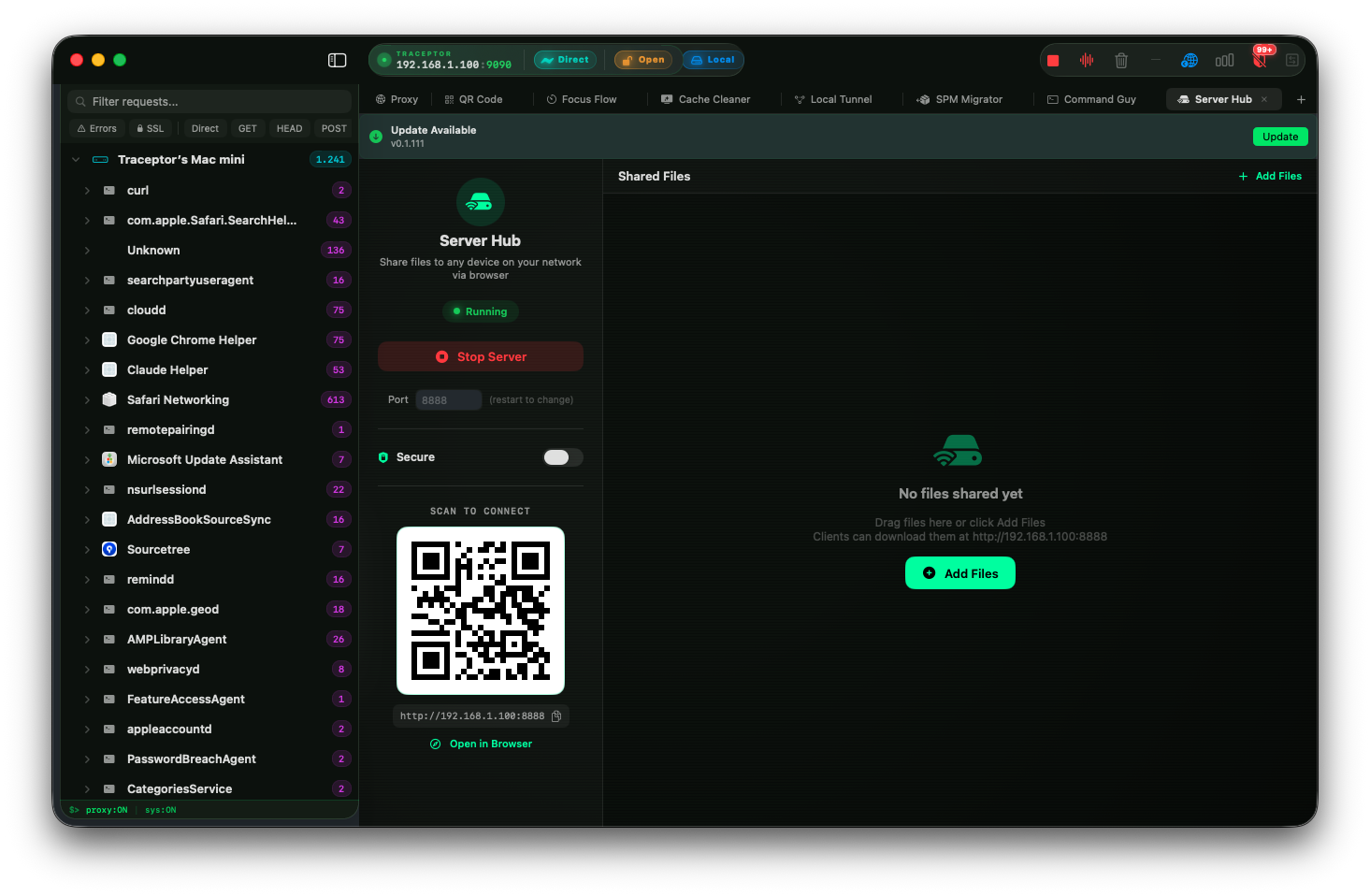
Server Hub is a workspace tab in Traceptor. Open the tab, click Start Server, and Traceptor spins up a tiny embedded HTTP file‑server on your Mac. The default port is 8888. Anything you drag into the file list becomes available to every device on the same Wi‑Fi network. A device joins by scanning the QR code with a phone camera, or by typing the LAN URL into any browser on a laptop. There is nothing to install on the other side — it’s just a web page.
The tab is built around a familiar two‑pane layout. The left side panel holds the controls: a Running / Stopped status badge with a live color dot, the Start/Stop button, a port editor, and the QR code that encodes the server’s LAN URL. The right side is a file list with category filter chips. The whole tab is washed in the distinct cyan‑green accent color that marks Server Hub apart from the rest of the app.
Set it up in 4 steps
The whole point is that this is faster than the alternatives. Here is the entire workflow for LAN file transfer from a Mac, end to end.
Open the Server Hub tab in Traceptor
Click Start Server
http://192.168.1.42:8888. If your network is unusual the IP can differ; the QR always encodes whatever the OS reports as your LAN address.Drag files into the file list
SharedFileTypeand tags it with a colored category chip. The categories are fixed and obvious: video (purple), image (blue), audio (pink), HAR (orange), JSON (green), text (teal), and other (a neutral secondary tone). The list updates instantly — files don’t need to be copied or re‑encoded; the server just streams them from the original location on disk.Hand off the QR code or the URL
Real use cases
Any time you want to send a file Mac to phone on the same network without involving the cloud, this is the path. A few specific examples that come up every week in mobile‑app work.
Side‑load an IPA or APK onto a test device
You just produced a signed build from Xcode or Android Studio. Drop the .ipa or .apk into Server Hub, scan the QR from the paired test phone, and download it directly. From there your provisioning tool of choice picks it up. No TestFlight wait, no Google Play internal track, no email attachment limit.
Send a Frida script to a paired iPhone
Hooking workflows often want a .jsFrida script on the device itself. Drop the script into Server Hub, grab it from the device’s browser or pull it down with the debug bridge of your choice. Faster than re‑packaging it into an app bundle and a lot less annoying than emailing yourself a text file.
Quick screen recording handoff
You captured a 200 MB .movon the Mac and a teammate needs it now. Drop it in, share the URL, and they pull the full‑quality file straight off your machine at LAN speed. No 30‑minute iCloud sync, no Slack “file too large” refusal, no guessing whether the compression preset stripped your annotations.
Avoid the iMessage compression on a screenshot
Sending a screenshot to a colleague’s phone through iMessage can quietly recompress a PNG into a blurry JPEG. Drop the original onto Server Hub, scan from their phone, and the byte‑exact file lands in the Photos roll. This matters more often than you’d guess — pixel diffs on a UI bug review are useless if the screenshot got re‑encoded.
How it works under the hood
Server Hub is not a separate daemon or a bundled Python server. It rides on the same SwiftNIO channel pipeline that powers Traceptor’s main HTTP/HTTPS proxy — the same code path that intercepts thousands of requests per second on a busy debugging session. Start binds a fresh listener on the chosen port; Stop closes the channel and drops every connected client cleanly. Only one Server Hub instance can run per workspace. Switching workspace tabs does not stop it, which is what you want when you’re going back and forth between the file list and the rest of the app.
Custom port
The default port is 8888 because it is almost never taken on a developer laptop, but the port field is editable inline. Stop the server, change the number, hit Start again. Reasons you might want to:
- Another tool already owns 8888.A second copy of Jupyter, an Adminer instance, a half‑remembered Docker container.
- Corporate Wi‑Fi blocks ports in the 8000 range. Some guest networks are surprisingly aggressive. Try 8443 or 5050.
- Memorable URLs. Pinning Server Hub to
:8080on every machine you own makes the URL easier to type from a phone you don’t feel like scanning a QR with. - Conflict with the other hubs.If you’re also running Sharing Hub on 7777 and Coding Hub on 9999, leave Server Hub on 8888 and you’ll never collide.
Server Hub vs Sharing Hub
Traceptor has two hubs that look similar but flow opposite directions. Server Hub sends from the Mac outward — you drop files in, devices on the LAN download them; default port 8888. Sharing Hub does the reverse — a phone on the LAN uploads photos, recordings, or HAR files into the Mac; default port 7777. Same QR + LAN URL pattern, same category chips, same SwiftNIO listener under the hood. Pick by which way the file is moving.
Safety
Keep reading